Diet Calculator using TDEE
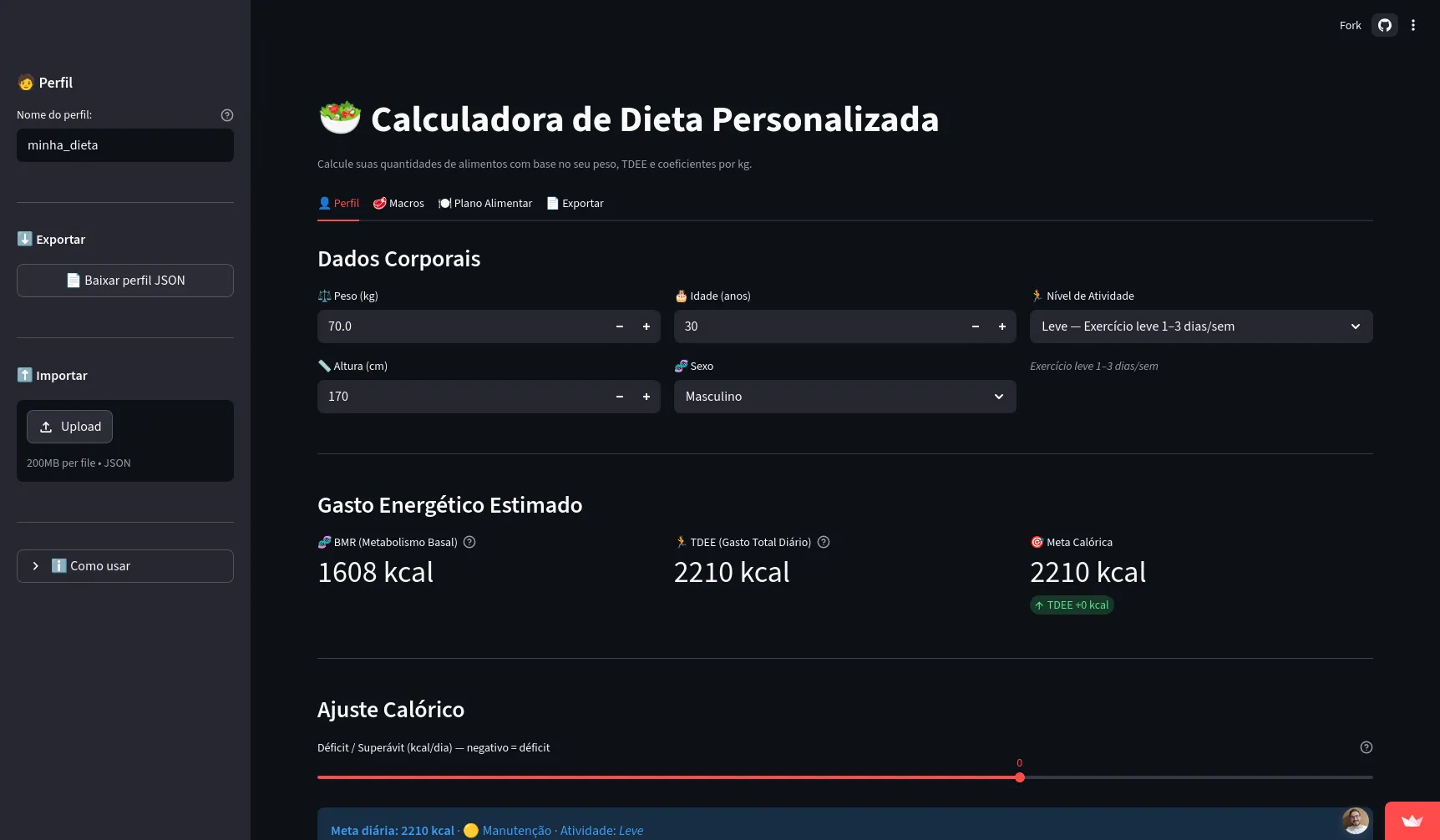
From a chaotic Excel spreadsheet to a real calculator
For almost 10 years I have been going in and out of what is considered obese. During the pandemic I reached 130kg (or more), and in 2021 I decided I would change that for good. With the help of my cousin who is a nutritionist @nutrileoguaitaneli, I managed to reach my dream two digits on the scale, weighing 97kg. That was thanks to a great diet and of course a lot of training and dedication from my side.
But after reaching that goal I got sloppy, college got intense, TCC 1 hit hard, and my internship stopped being a 6h internship and became a real 8h job. In 1 year I managed to keep part of what I achieved, but by the end of the year I was around 102kg +-. I moved to Portugal for a masters and without being able to keep a good diet and start training for 1 year I went back to 115kg again.
So I decided to study a bit more on my own and apply some techniques I learned to try to lose weight again, this time alone. I started my training and a diet still based on the foods I had from the previous one and using the TACO table: Tabela Brasileira de Composição de Alimentos
So every month for about 10 months I had to understand my progress, understand my needs, and what needed to be changed. I used an Excel spreadsheet that had to update a lot of data, adjust macros, copy and paste values from one sheet to another, and also do rule-of-three calculations for food quantities manually to reach a final usable spreadsheet like this:
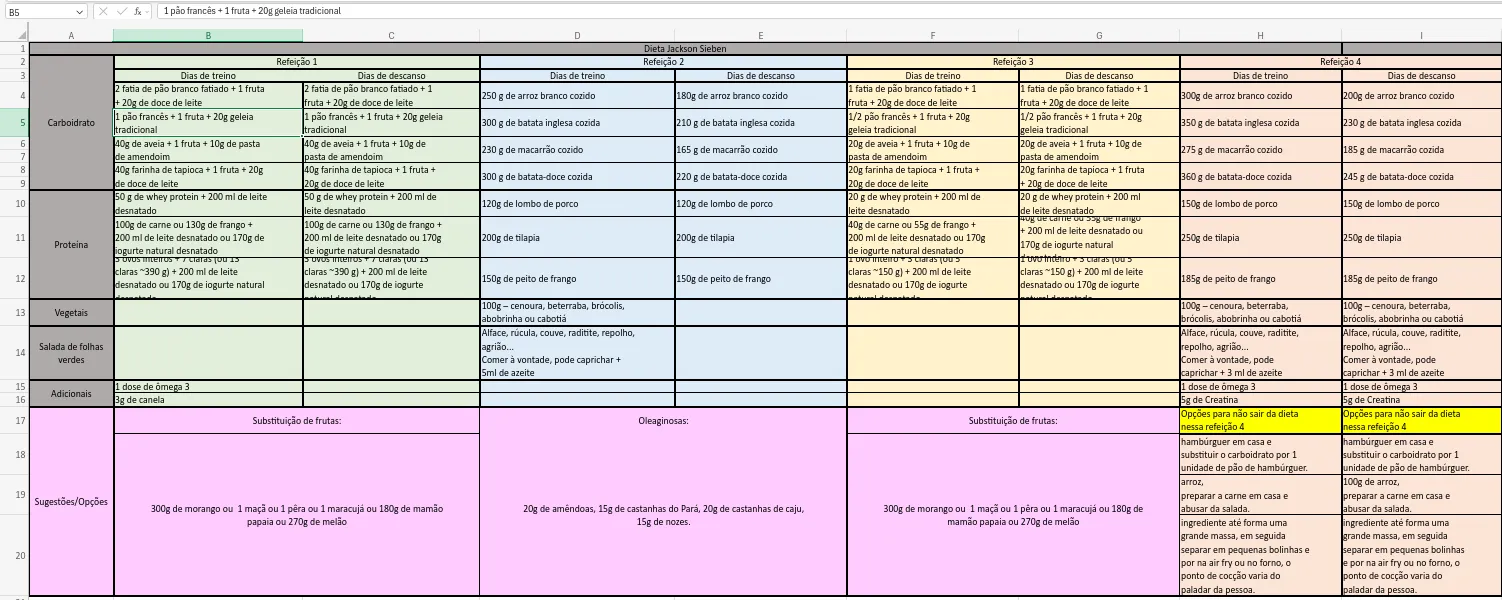
So on a quiet weekend I decided to use what I know about TACO, nutrition (totally amateur), and TDEE to create something that would make it easier to do all the math and generate the final PDF diet. From that, the Diet Calculator App was born, built with Streamlit and also published on Streamlit Community Cloud to make access easier, and it is also available on my GitHub diet_calculator_app.
Why use TACO?
The TACO table is the official nutritional table in Brazil and a reference in many areas including nutrition (and of course the one I know and heard my cousin talk about), which is why I chose it. But curating it for use is not so simple, since officially there is no Excel or CSV with the data available and ready to use. However, there are some versions available in GitHub repositories or even in universities like USP TACO. Fortunately a few years ago I had already built a database for another project (maybe one day it gets finished and I will talk about it), and I already had a schema prepared from an old dump to use with that data.
So to avoid having to host a database on a server/platform, I chose to generate a JSON with the foods I already used in the previous diet and a few more that I constantly needed, resulting in the JSON file I used to generate diet_data.py.
Objective
So the big objective is:
- A simple app to generate my diet in PDF.
- Customizable for TDEE, macro split per meal, and the possibility of using different macro and calorie values on rest days and training days.
Something simple, nothing overengineered, so I did not allow advanced food customization. For now it is only the foods I already had in my Excel diet.
Building the app
I built this app using Claude Sonnet 4.6 and Opus 4.6 which were still available at the time on the GitHub Copilot Educational plan (R.I.P GitHub Copilot). But of course not everything LLMs can do without human intervention, and it was my first and biggest Vibe Coding experience so far. I initially described that I wanted to use Streamlit and created screen by screen to reach the final result. It took about 3 days to build the whole app. I started on Friday night and by Sunday afternoon it was already live with few changes after that.
Explaining the app
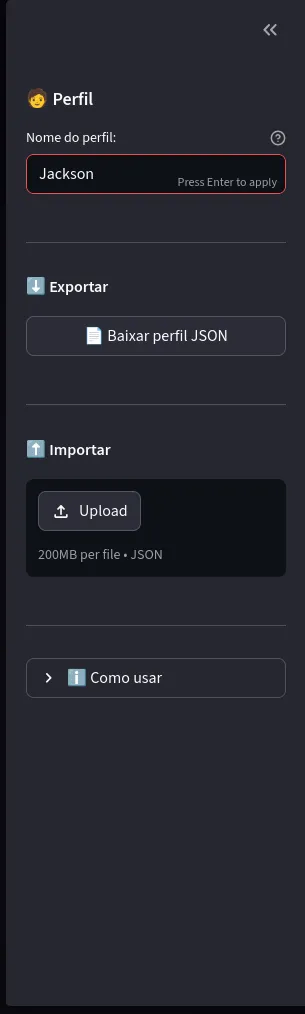
To make life easier for whoever uses the tool and of course not store any user data, I decided to create a JSON for your profile. One reason for that was also not exposing my personal data and letting others use it without fear. Another option was to store it in browser local storage (which I thought about and maybe I will implement), but I also thought of use cases like nutritionists who have many patients. So I made a profile import/export on the Streamlit app sidebar as shown below. It only uses the JSON data to let you import a previous diet or a default you already use, and you can modify it in the app.
Using the profile or not, you can change on the profile tab (shown below) the data to calculate your Total Daily Energy Expenditure (TDEE), basically how much you burn per day in calories. This calculation was done using the Mifflin-St Jeor method.
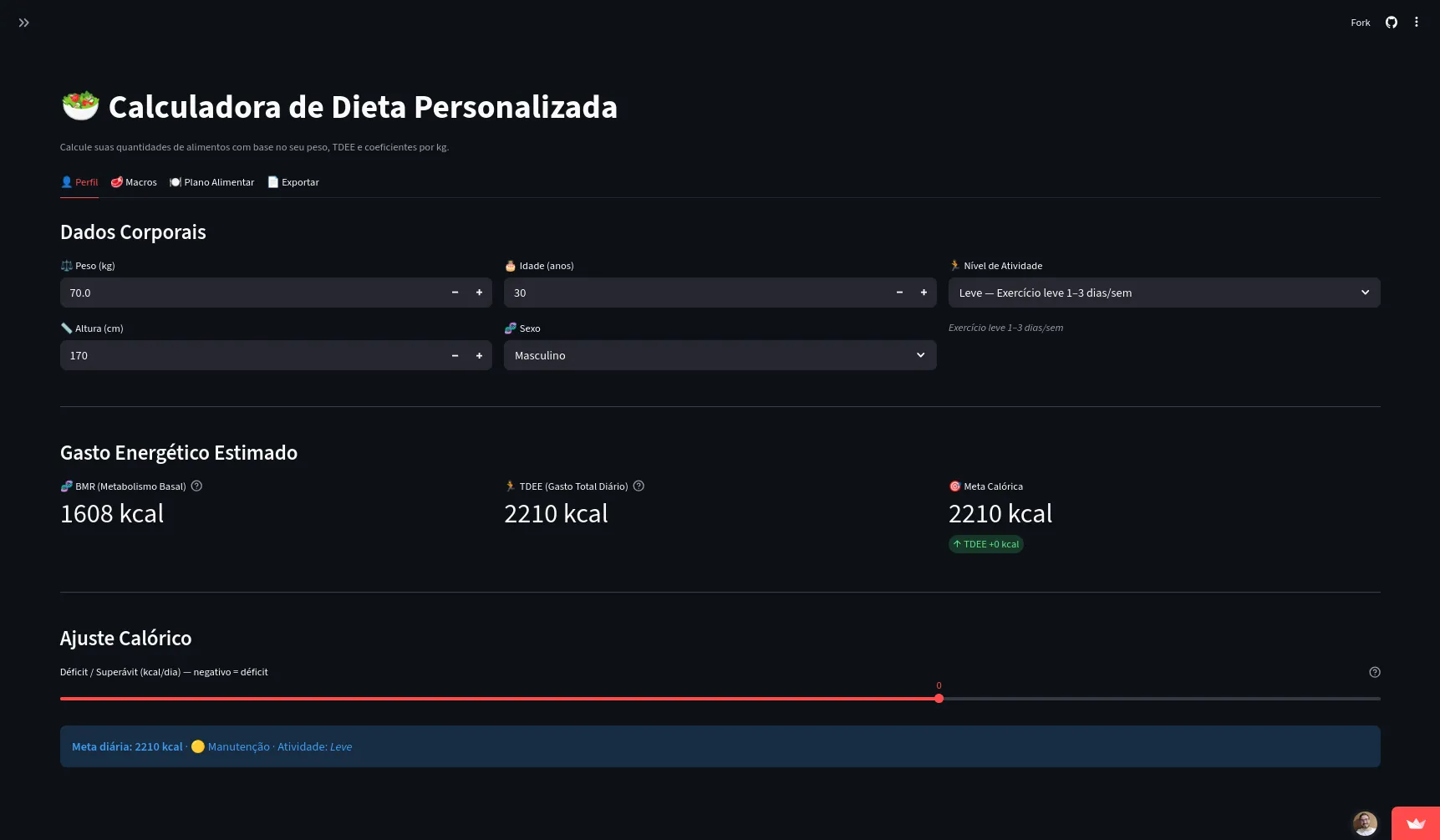
In a simple way, this method starts by calculating your basal metabolic rate (BMR), which is the amount of calories your body needs just to keep functioning even if you stayed at rest all day.
After that, the system takes into account your daily activity level (training, work, walking, etc.) to reach the TDEE, which is the value closest to your reality.
In short:
- BMR: calories to survive (breathing, keeping organs working, etc.)
- TDEE: total calories burned in the day (including your activities)
With that number in hand, it is much easier to adjust the diet:
- Eat less than TDEE -> tends to lose weight
- Eat equal to TDEE -> tends to maintain weight
- Eat more than TDEE -> tends to gain weight
An interesting part is the slider that lets you adjust to a deficit or a calorie surplus with some precision, still showing an alert if it is too high according to the method.

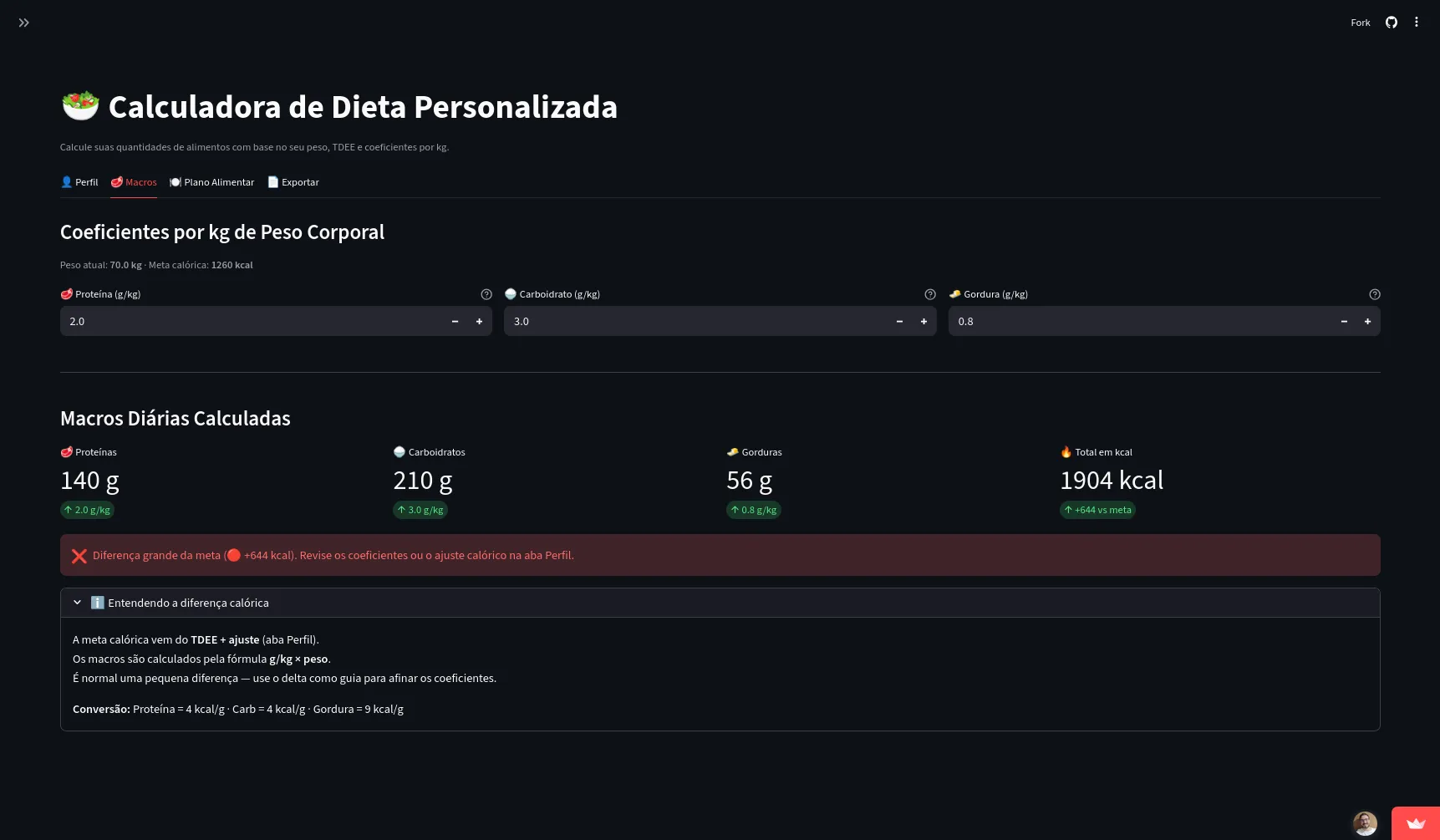
Moving to the Macros tab, it is basically where you distribute and calculate how many grams of each macro you want to use per kilogram of body weight. It is important that you adjust the grams per kilo until they hit the target set in the previous tab. Nothing stops you from not doing it, but do it right. After you set grams per kilo per macronutrient, it shows how many grams of that macro you should eat per day, remembering that grams of macronutrient are not the same as grams of food. For example, 100g of chicken breast has on average about 30g of the protein macronutrient.
Now the meal plan tab, where you actually adjust the percentage of each macro for each meal using the macro distribution section shown below. Obviously the total must be 100% for each macro so you can fully hit the plan.

Below that section there is a quick view of the meals, the idea is:
- R1 -> Breakfast
- R2 -> Lunch
- R3 -> Afternoon snack
- R4 -> Dinner
To make development easier and also because I have been doing these 4 meals for years, I did not allow that to be adjusted, but I think this 4-meal plan fits well for many cases.
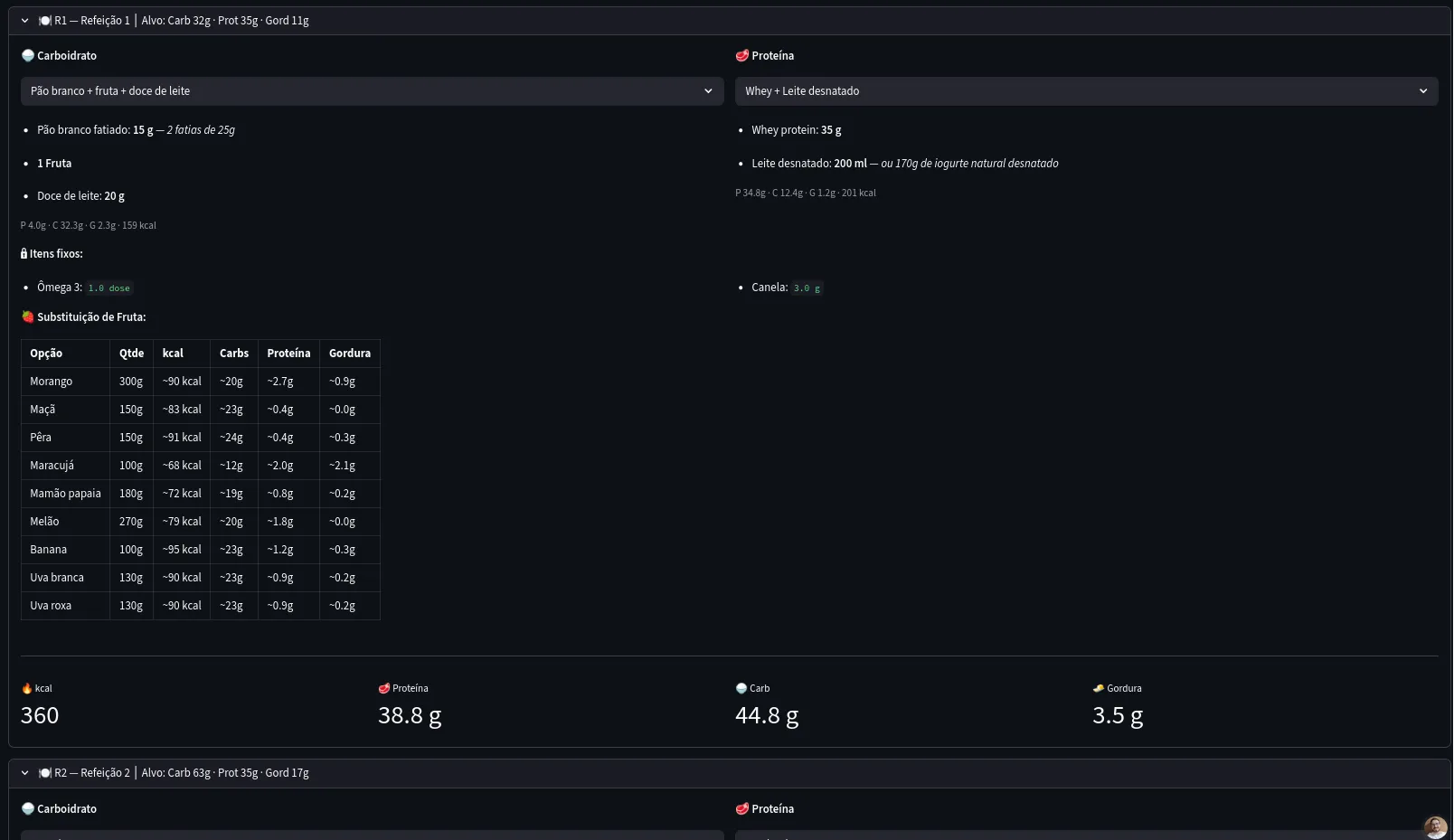
So far these sections were in the training days sub tab, meaning the days when you will do some physical activity, which allows you to consume a bit more calories. There is also the rest days sub tab, like weekends, or days when you cannot do anything relevant to account for extra caloric expenditure. The macro distribution is separate in case you want to differentiate something, but the most important part is the carbohydrate reduction per meal. I allowed only a carb reduction because it is the most recommended, since regardless of your age and training it is always important to keep a balanced protein diet, not only to help body recomposition but to help keep the few muscles we have. If I am not mistaken, we lose on average 1% of muscle mass per year, so we need to run after that loss, right.

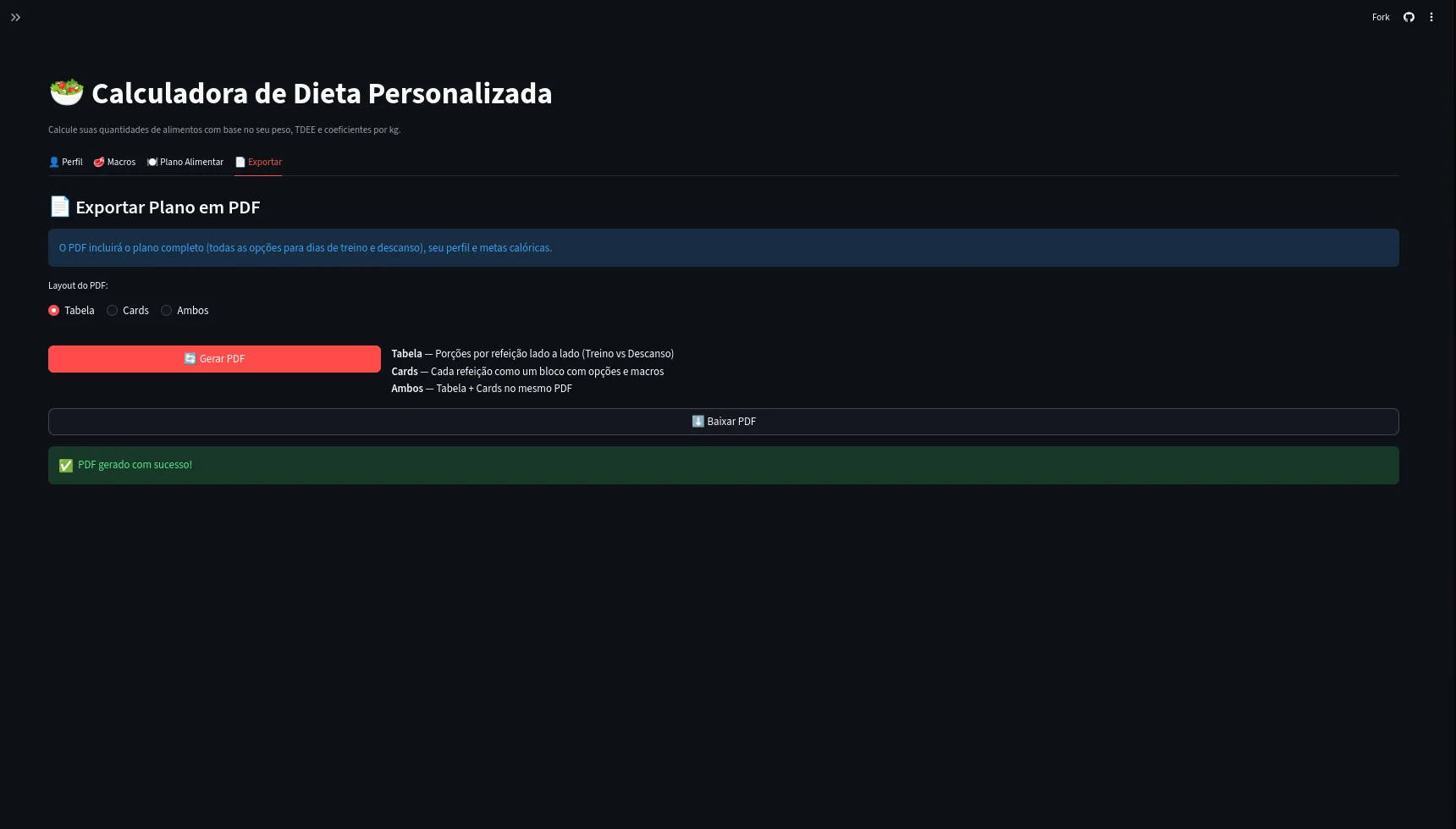
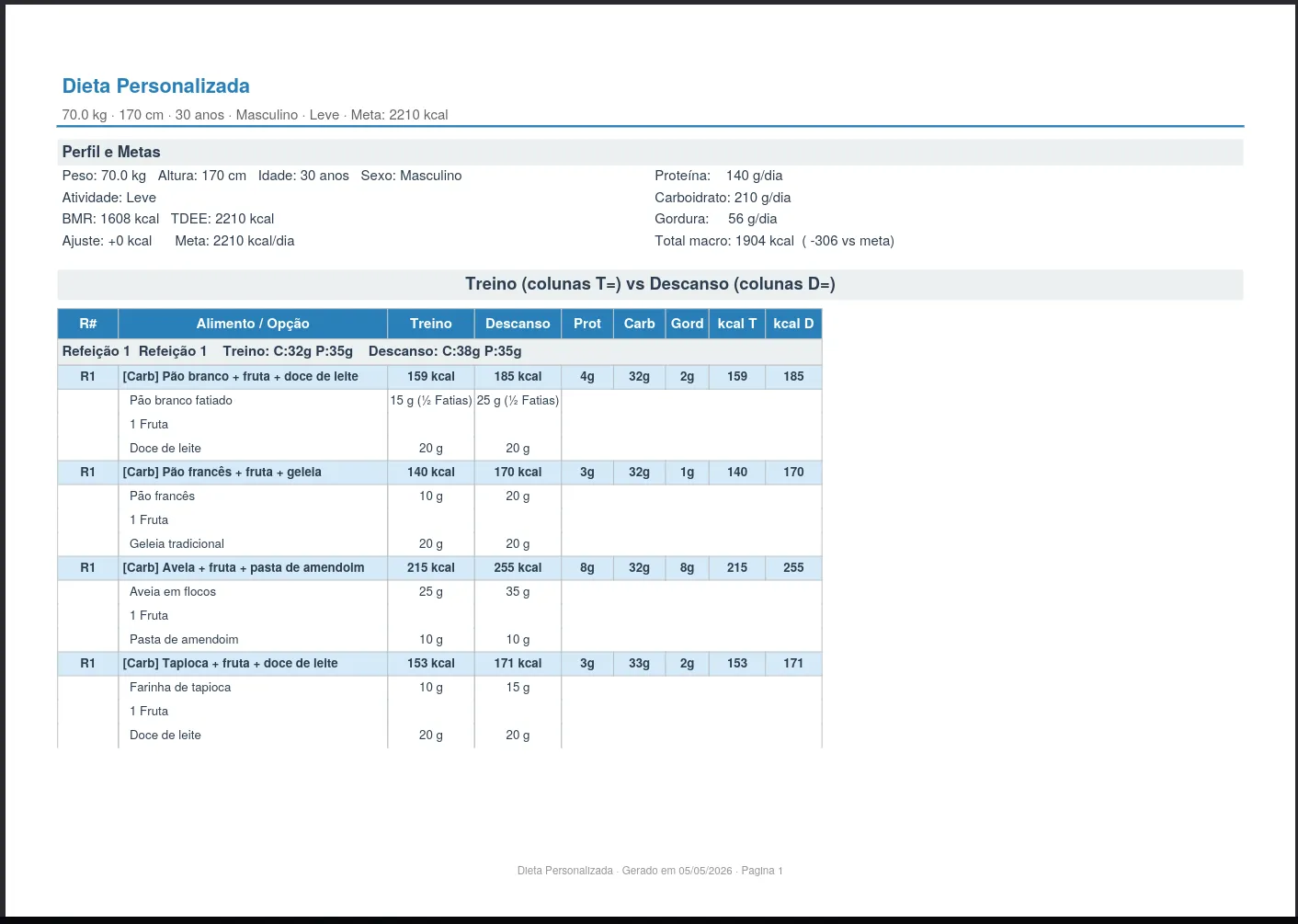
And last but most important, the PDF of all this. There are 2 styles the diet can have visually. The first is the table version shown below. It is the most detailed version in table form and in landscape format. It was the first version I made and honestly I thought it looked kind of ugly and confusing even though I am a nerd and like details.
Then I also created the Card version, something a bit simpler and more direct but still containing all the food options per meal so you can substitute. The separation of training days and rest days, substitutions for the main fruits (and the ones I like and actually eat).
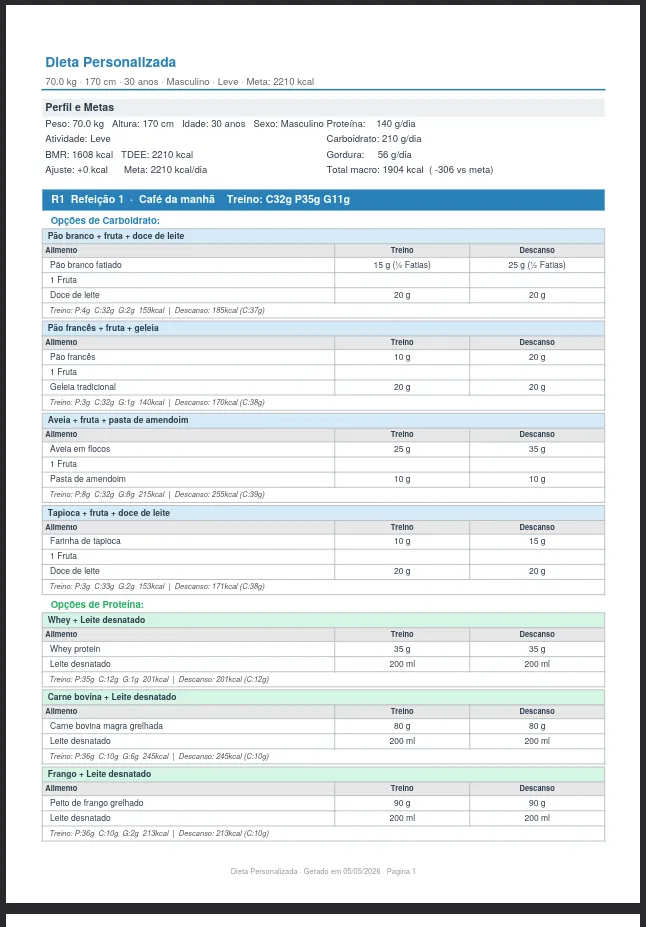
Anyway, using this training and diet approach I went from 118kg to 102kg. Using the app to help me build my diets I managed to lose around 5-7kg, but nothing in this app is different from what I did in the Excel spreadsheet, just a faster way since I save my profile, load it, and adjust as needed. It is not something you should do without minimal instruction or knowledge, but it is meant to be treated as a tool.
Well this is the app I am using. If you want to use it, it is fully available at the link I shared at the start of the post. If you have any idea for improvement (and I have free time), feel free to comment on the GitHub repository or even submit a PR with suggestions for changes that I will try to always check.